Do Ethernet Couplers Reduce Speed? Why Gigabit Drops to 100 Mb/s and How to Check
Do Ethernet Couplers Reduce Speed? Why Gigabit Drops to 100 Mb/s and How to Check
A passive RJ45 coupler does not lower the link speed by design. It only joins the eight conductors of two cables; it does not negotiate, buffer or retransmit data. What it adds is one more mated connection, with a little extra insertion loss, reflection and crosstalk, inside a channel whose length allowance does not restart at the coupler. On a short, healthy run the link normally stays at 1 Gb/s. If it falls to 100 Mb/s after you add a coupler, the usual causes are an open or poorly contacting pair (1000BASE-T needs all four pairs, 100BASE-TX only two), a split pair, an over-long total run or a worn plug. Check the reported link speed first, then swap the coupler and each cable one at a time. For a permanent panel or enclosure pass-through, choose a coupler marked for your cable category and shielding.
Does an Ethernet coupler reduce speed or degrade the signal?
It degrades the signal slightly; it does not set the speed. The two plug-to-jack interfaces and the internal conductors add insertion loss, and any impedance change creates reflections. When the complete channel still meets the requirements of the application, the link runs normally. When the run already has little margin, the extra connection can expose a weakness that was there before.
Separate link speed from throughput. Start with the speed reported by the network adapter or switch port. A change from 1 Gb/s to 100 Mb/s points to pairs, contacts or port settings. If the link stays at 1 Gb/s but transfers are slow, look at error counters, link resets, the endpoints and network load instead. A local file transfer between the same two ports isolates the extension better than an internet speed test.
Why is my Ethernet only 100 Mbps after adding a coupler?
Many Gigabit ports fall back to 100 Mb/s when one of the four pairs is missing or unreliable, because 100BASE-TX only uses pins 1-2 and 3-6. Use this table to narrow the cause:
| Symptom | Likely cause | What to check |
|---|---|---|
| Link negotiates at 100 Mb/s and stays there | Pair 4-5 or 7-8 open somewhere in the run; a cord with only four connected conductors | Wire-map each cable and the path through the coupler; replace four-conductor cords |
| Link flips between 1 Gb/s and 100 Mb/s, or shows errors | Marginal pair: split pair, damaged plug contact, or a total run that is too long | Use a tester that detects split pairs; add up the length of both cables and all patch cords |
| Link drops when the cable is moved | Broken latch, deformed or dirty contacts, sideways strain on the coupler | Reseat, support the cables near the coupler, swap each cord separately |
| Link stays at 1 Gb/s but transfers are slow | Not the coupler: errors, endpoint limits or network load | Check CRC and error counters; run a local transfer between the same ports |
| Port shows 100 Mb/s even with a known-good cable | Speed fixed in the port configuration, or a 100 Mb/s device at the other end | Set auto-negotiation on both ends; confirm both devices support Gigabit |
| Errors appear only near motors or other noise sources | Shielded and unshielded parts mixed, or a break in the shield path | Use one cabling type end to end; verify shield continuity through the coupler |
A simple continuity tester can pass a split pair, because every pin connects to the right pin while the two wires of a signal pair belong to different twisted pairs. Eight LEDs lighting in sequence is only a basic check.
What are the downsides of using an Ethernet coupler?
- One more connection in the channel.Each coupler adds two plug-to-jack interfaces and uses some of the channel's loss and crosstalk margin.
- The distance limit does not reset.A conventional 100 m channel is typically up to 90 m of fixed cabling plus 10 m of cords. It does not allow 100 m on each side of a coupler.
- Mechanical strain.A coupler hanging in a cabinet should not carry the weight of a cable bundle; sideways pull is a common cause of intermittent contact.
- Shielding has to match.A shielded coupler between two unshielded cables does not create a shielded channel, and an unshielded coupler breaks the screen of a shielded run.
- Chaining adds up.Every additional coupler is another connection; if you need several, redesign the route or add active equipment instead.
Do Ethernet couplers work with PoE?
A passive coupler passes all eight conductors, so PoE current flows through it like any other connection in the run. What matters is the contact current rating and the extra contact resistance, which adds to the cable's voltage drop and heating. The datasheets of SYTUS030026SL, WHZJT020295 and SYTZT1188GWC8D3T5E387 give a 1.5 A current rating but do not state how that rating applies across the contacts or relate it to PoE classes; the SYTZT1188GWC9DY3S2T6387 drawing gives no electrical ratings. If the extension will carry PoE, send the PoE type, cable length and installation environment to our FAE team before you choose a part.
Are all RJ45 couplers the same? How to choose one for a Gigabit link
No. They differ in category marking, shielding and how they mount. Match all three to the cabling on both sides. The category on the parts below is the marking on the housing or in the datasheet title; their datasheets do not publish insertion loss, return loss or NEXT figures, so qualify the installed channel by testing it.
| Installation need | VOOHU part | What the datasheet shows |
|---|---|---|
| Unshielded Cat6 cabling, snap-in panel cutout | SYTUS030026SL | Housing marked CAT.6; unshielded; ABS UL94V-0 body 16.75 × 30.60 mm; panel cutout 14.80 × 16.5 mm (no latch) or 14.80 × 19.30 mm (single latch, 1.60 mm panel); 50 µ" gold in the contact area; −40 to +85 °C |
| Shielded Cat6 cabling, flange with screw holes | SYTZT1188GWC9DY3S2T6387 | Titled Cat6 shielded 8P8C pass-through, housing marked CAT.6; two nickel-plated phosphor-bronze shield shells; 26.00 × 32.00 mm flange with 2 × Ø3.10 mm mounting holes |
| Shielded Cat6 through a round hole in an enclosure | WHZJT020295 | Cat6-marked M22 zinc-alloy threaded body; pins 1–8 and the shield (S to S) connected straight through; Ø22.20 mm cutout with a 21.00 mm flat; silicone dust cap |
| Shielded Cat5e cabling | SYTZT1188GWC8D3T5E387 | Housing marked CAT.5e; C2680 brass shield, nickel-plated; operating −20 to +75 °C |
Electrical ratings from the same datasheets: SYTUS030026SL and SYTZT1188GWC8D3T5E387 are rated 125 VAC and 1.5 A, with 1000 VAC rms dielectric withstanding for 1 min, 500 MΩ min insulation resistance at 500 VDC, 30 mΩ max contact resistance and 750 mating cycles. WHZJT020295 is rated 125 VAC rms and 1.5 A, with 30 mΩ max contact resistance, 500 MΩ min at 100 VDC and 300 VAC or 500 VDC dielectric withstanding for 1 min.
To compare all Cat6 options, filter theRJ45 inline coupler selector. For outdoor or wash-down panels, seewaterproof Cat6A RJ45 couplers.
产品SYTUS030026SL
产品WHZJT020295
How do I test a coupler extension before it goes into service?
- Connect the same equipment with one known-good cable and record the negotiated speed, local throughput and port error counters.
- Fit the planned assembly of two cables and the coupler. If the results change, replace the left cable, the right cable and the coupler one at a time while keeping everything else the same.
- For a permanent panel or cabinet installation, test the complete channel with all intended cords and connections: wire map, insertion loss, return loss and near-end crosstalk against the applicable category, plus shield continuity where relevant. Testing the fixed cable alone does not cover the channel after the coupler is added.
- Route and secure the cables in their final positions, then watch sustained traffic and stability. A single full-speed transfer does not rule out an intermittent contact.
FAQ: Ethernet couplers and speed
Q1: Does a 250 MHz Cat6 rating mean the speed is limited to 250 Mb/s?
No. MHz is the frequency range over which the cabling performance is specified; Mb/s and Gb/s describe the data rate. Cat6 performance is specified up to 250 MHz, and Gigabit Ethernet runs well within that.
Q2: Can a coupler join two 100 m cables into a 200 m Gigabit run?
No. A passive coupler neither regenerates the signal nor restarts the distance allowance. For longer runs, add a switch or other active equipment, or use fiber.
Q3: Will a metal shielded coupler improve two unshielded cables?
No. Shielding only works when the cable screens, the plugs, the coupler and the equipment grounding form a continuous path. Between unshielded cables, an unshielded coupler such as SYTUS030026SL is the consistent choice.
Q4: Is a Cat5e coupler enough for Gigabit Ethernet?
Cat5e cabling fully supports 1000BASE-T, so a Cat5e-marked coupler can be part of a Gigabit channel. Keep the categories consistent, though: a Cat5e coupler in a Cat6 run means the channel should be treated as Cat5e.
Request coupler samples
Planning an Ethernet pass-through on a panel or enclosure? Send the target speed, the length of both cables, whether the cabling is shielded and your panel cutout through oursample request form. Samples are available for evaluation, and selected parts are free of charge. Our FAE team will be glad to confirm the options for your project, including which coupler fits your cutout and whether its rating suits a PoE extension. VOOHU supplies RJ45 and SFP connectors, LAN and PoE transformers and common mode chokes from Suzhou, China, to more than 1,500 customers.
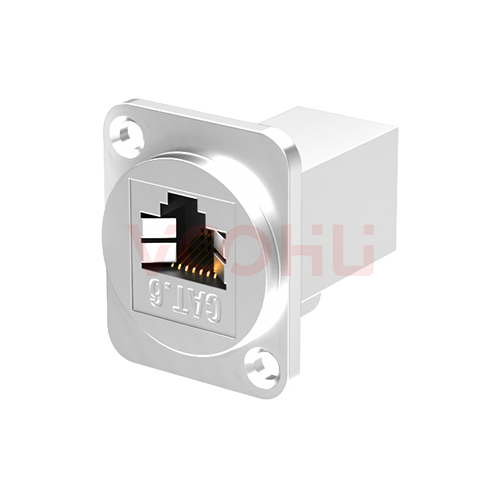 SYTZT1188GWC9DY3S2T6387 CAT6 straight through shielded 8P8C double hole RJ45 shielded pass-through module
> View Details
SYTZT1188GWC9DY3S2T6387 CAT6 straight through shielded 8P8C double hole RJ45 shielded pass-through module
> View Details
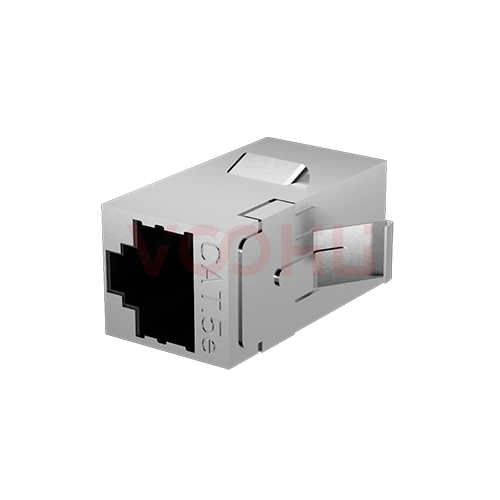 SYTZT1188GWC8D3T5E387 RJ45 shielded pass-through module CAT5.e
> View Details
SYTZT1188GWC8D3T5E387 RJ45 shielded pass-through module CAT5.e
> View Details
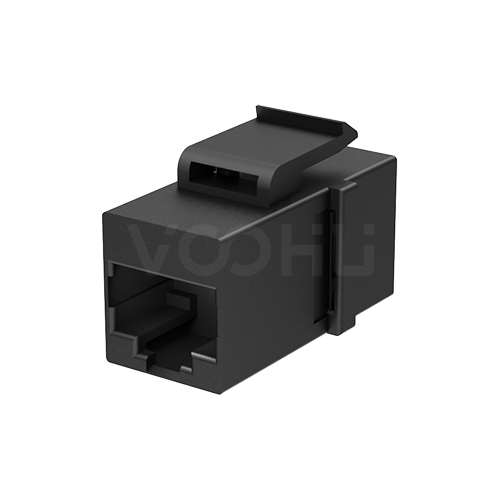 SYTUS030026SL Without EMI RJ45 Straight connector
> View Details
SYTUS030026SL Without EMI RJ45 Straight connector
> View Details
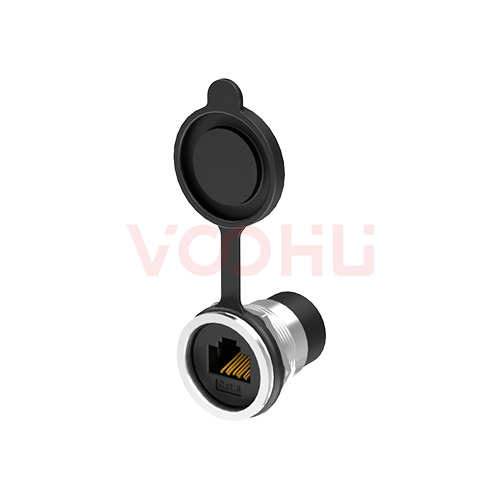 WHZJT020295 CAT6 250MHz 6U
> View Details
WHZJT020295 CAT6 250MHz 6U
> View Details