Number of contacts
Two contacts describes the electrical interface, not every retention or shielding lead.

I/O Connector products
Select a cable-side plug or board-side socket for a Single Pair Ethernet interface. The current catalog includes a 2-contact crimp plug and a PCB socket. Compare termination and layout, then verify specified mating parts, dimensions and electrical conditions. Request samples, pricing or an existing-part assessment.
Part number search & selector
The table uses the current English-site product records, published selection fields and part-specific technical-file links.
* Frozen Image and Part Number columns · drag horizontally to review all specifications
| Image | Datasheet | Compare | Downloads |
Contacts
|
Connector form factor
|
Rated current
|
Rated voltage
|
Termination method
|
Sample |
|---|
| Image | Part number | Datasheet | Compare | Downloads | Contacts | Connector form factor | Rated current | Rated voltage | Termination method | Sample |
|---|---|---|---|---|---|---|---|---|---|---|
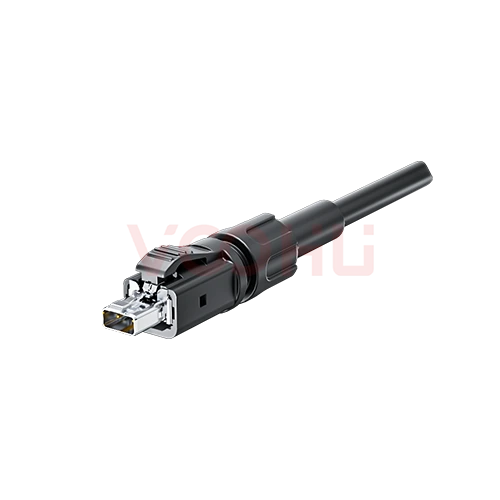 |
WHSPE00468 | SPEC | 2 PIN | Plug | 4A | 60V | Crimp |
|
||
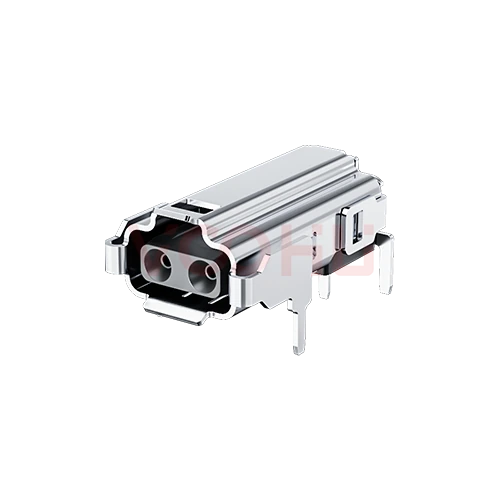 |
WHSPE00467 | SPEC | 2 PIN | Socket | 4A | 60V | THT |
|
Broaden the selected filters or clear the current search.
Product family quick links
Counts reflect the current published product data.
How to select
Narrow the published fields in sequence, compare the remaining candidates and verify the part-specific files before design-in.
Specify the equipment PHY, mating interface, cable and any power-over-data requirement.
Review the crimp process for the cable end and the footprint and assembly process for the board end.
Use controlled drawings to verify mating parts, clearances, temperature-rise and electrical conditions.
Review available files and validate samples; submit requirements even if some parameters or the final part are not yet defined.
Key selection parameters
Two contacts describes the electrical interface, not every retention or shielding lead.
Distinguish cable and board ends and confirm pairing from specified drawings.
For crimp termination, check wire size and tools; for PCB termination, check holes and solder process.
Read ratings with temperature-rise and environmental conditions; their product does not establish PoDL system power.
Confirm the interface-standard part, PHY, cable and PoDL requirements separately.
Product family comparison
Use this summary as a routing step, then verify every required value in the exact part-number row and linked technical files.
Return to the selector ↑| Contacts | Parts | Connector form factor | Rated current | Rated voltage | Termination method | Action |
|---|---|---|---|---|---|---|
| 2 PIN | 2 | Socket, Plug | 4A | 60V | THT, Crimp | Filter → |
Technical performance & application fit
Application suitability is part-number specific. Treat the catalog fields as a shortlist, then confirm the design against the linked technical files.
Downloads & technical resources
Search a full or partial SKU, then open its datasheet, 3D model or PCB footprint without returning to the product table.
Showing representative available file sets. Search to find a specific SKU.
VOOHU’s published product content is reviewed by its engineering team. Specifications, downloads and technical support information are tied to specific part numbers, so you can verify them before requesting samples or a quotation.
Category overview
SPE trades bandwidth for cable mass, and the interface is defined by a published standard rather than by contact count.
Discuss a new design
Contact FAE for a replacement assessment.
Already have a part number? Request samples or a quote.
A conventional copper Ethernet link uses two or four twisted pairs. Single Pair Ethernet carries the link on one, which cuts cable weight, diameter and connector size. That is the whole reason it exists, and it is why it suits sensors, field devices and vehicle harnesses where cable mass is a real cost.
Two contacts is the minimum an SPE link needs, but several mating faces are published for different environments. Two connectors with two contacts each will not necessarily mate. Confirm which interface standard your network specifies, and confirm it for both ends of the link.
The current listing is a cable-side crimp plug and a board-side socket. If your design needs a different mating face, a screened version or a sealed body, send the standard and the environment rather than working around the parts listed here, and our engineers will confirm what can be supplied.
FAQ & related guides
These answers guide the page workflow. Part-specific engineering limits still come from the linked technical files.
It is an interface component for Single Pair Ethernet, used with a suitable PHY, cable and circuit. The connector alone does not perform Ethernet protocol conversion or packet forwarding.
The catalog lists a 2-contact crimp plug and a 2-contact PCB socket respectively. Use them as cable-side and board-side candidates, then confirm designated mating and assembly conditions from the drawings.
The same catalog and contact count are not sufficient proof. Request mating drawings, check interface shape, retention, contact positions and accessories, then validate samples.
Confirm the specific IEC part from controlled product documentation or conformity evidence. The SPE name does not establish universal mating compatibility. Submit the required part and edition for review.
No. Review rating conditions, temperature rise, cable and termination, the system power class and validation evidence. Component ratings do not replace a powered-channel assessment.
Use the selected part’s contact and assembly specifications for conductor size, strip length, tooling and pull-force requirements. Request missing process documents rather than copying values from a similar connector.
No. The PCB pattern may include retention or shielding connections. Verify hole sizes, spacing, orientation and board-edge distance from the drawing, and request design data if no footprint file is listed.
For a known part, send the part number, quantity, cable/PCB requirement, destination and timing. For new selection, describe the interface, wire size, environment and power needs for sales and FAE review.
Engineer support
Send the candidate part number and the condition you need reviewed. Sample support can be added after the selection is clear; commercial questions may be discussed in the same engineering conversation.
Include the document revision
Temperature, isolation voltage and PoE current basis
Pin count, pitch and spacing between pin rows
To help prioritize samples and evaluation
When you need candidates and a comparison of differences
Engineering review identifies candidate parts and explains the differences.
From the selector or engineering review
Prototyping / pilot build / production
Specify sample and production timing separately
Compliance documents, material declarations or third-party reports
Sample quantity, lead time and cost depend on the project stage and part number. Sales will respond on business days.