Performance category
Confirm Cat5e/Cat6 in the part specification rather than inferring an absent category from its name.

I/O Connector products
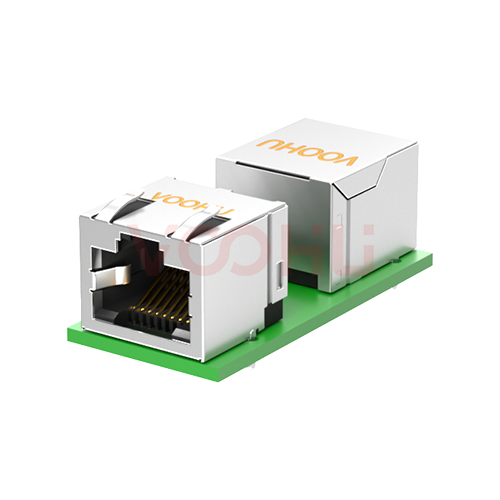
Join RJ45 cable interfaces or select a feedthrough for an equipment panel. Compare RJ45 inline couplers by Cat5e/Cat6 category, shielding and mounting design, then review wiring, dimensions and channel requirements. Request samples or volume pricing for your selected part.
Part number search & selector
The table uses the current English-site product records, published selection fields and part-specific technical-file links.
* Frozen Image and Part Number columns · drag horizontally to review all specifications
| Image | Datasheet | Compare | Downloads |
Network Level
|
Transmission Bandwidth
|
Shield
|
Gold plating of contacts
|
Panel
|
Sample |
|---|
Broaden the selected filters or clear the current search.
Product family quick links
Counts reflect the current published product data.
How to select
Narrow the published fields in sequence, compare the remaining candidates and verify the part-specific files before design-in.
Specify both interfaces, gender and contact mapping; assess any one-to-two adapter separately.
Choose documented Cat5e or Cat6 candidates for the channel; missing fields are not a pass.
Review shield grounding, panel retention, cutout and cable clearance.
Test at the intended length, data rate and power conditions, then send the part number, quantity and timing for a quote.
Key selection parameters
Confirm Cat5e/Cat6 in the part specification rather than inferring an absent category from its name.
MHz describes frequency, not achieved data rate in Mb/s.
Review shield continuity and grounding across the coupler, cables and equipment.
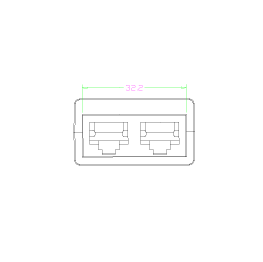
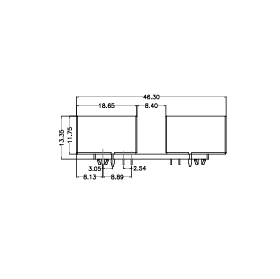
Check clips/fasteners, cutout, panel thickness and access on both sides.
Verify plating location and units and contact mapping; a one-to-two adapter is not an ordinary inline coupler.
Product family comparison
Use this summary as a routing step, then verify every required value in the exact part-number row and linked technical files.
Return to the selector ↑Technical performance & application fit
Application suitability is part-number specific. Treat the catalog fields as a shortlist, then confirm the design against the linked technical files.
Downloads & technical resources
Search a full or partial SKU, then open its datasheet, 3D model or PCB footprint without returning to the product table.
Showing representative available file sets. Search to find a specific SKU.
VOOHU’s published product content is reviewed by its engineering team. Specifications, downloads and technical support information are tied to specific part numbers, so you can verify them before requesting samples or a quotation.
Category overview
Couplers are simple parts, but two questions come up constantly: whether they slow the link, and which category to use.
Discuss a new design
Contact FAE for a replacement assessment.
Already have a part number? Request samples or a quote.
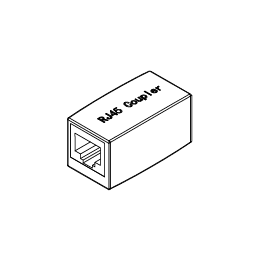
A coupler mates two RJ45 plugs back to back, so two existing cable runs become one channel without cutting and re-terminating either end. That is its whole purpose: extending or repairing a run with existing patch leads rather than making up a new cable.
Not in the sense people usually mean. A coupler does not reduce the negotiated link speed. It adds a connection point, which introduces an impedance discontinuity and a small insertion loss. On a short gigabit run that sits inside the margin. Near the length limit, or at 10G, it consumes margin already thin.
The channel performs to its weakest element, so a Cat5e coupler caps a Cat6A channel at Cat5e. Use a coupler at or above the category of the cable and the link. On screened installations, use a shielded coupler so the screen stays continuous through the join, or the shielding is defeated at that point.
FAQ & related guides
These answers guide the page workflow. Part-specific engineering limits still come from the linked technical files.
It does not necessarily reduce negotiated speed, but it adds a connection and changes channel loss. Results depend on the coupler, cables, length, termination quality and target rate. Select a documented part and test the complete channel; do not assume zero loss.
Choose for the specified cabling system and part datasheet, not only the device’s advertised data rate. Cables, plugs and couplers must all meet the channel requirements; upgrading one part does not upgrade the whole channel.
A shielded design provides a shielding connection that must work with the cable and grounding path. An unshielded design does not provide the same shield continuity. A metal appearance alone does not establish system EMC performance.
Assess the specific part and system. Review power conditions, contact resistance, temperature rise and mating requirements. An 8P8C or Cat6 label does not establish PoE, PoE+ or PoE++ suitability.
Do not assume so. Straight-through and special adapters may use different contact mappings. Check the selected part’s wiring diagram and viewing orientation.
No. A passive adapter does not perform active Ethernet switching. Any permitted wiring arrangement depends on its internal connections and the equipment at both ends; it must not be sold as two independent switched ports.
Check cutout, panel thickness, clips or fasteners, front/rear projection and access to the plug latch. Use the drawing for the selected part, not a similar-looking version.
Send the part number, sample or production quantity, shielding and mounting needs, destination and timing. If the part is not selected, start with the required cabling category and installation constraints.
Engineer support
Send the candidate part number and the condition you need reviewed. Sample support can be added after the selection is clear; commercial questions may be discussed in the same engineering conversation.
Include the document revision
Temperature, isolation voltage and PoE current basis
Pin count, pitch and spacing between pin rows
To help prioritize samples and evaluation
When you need candidates and a comparison of differences
Engineering review identifies candidate parts and explains the differences.
From the selector or engineering review
Prototyping / pilot build / production
Specify sample and production timing separately
Compliance documents, material declarations or third-party reports
Sample quantity, lead time and cost depend on the project stage and part number. Sales will respond on business days.