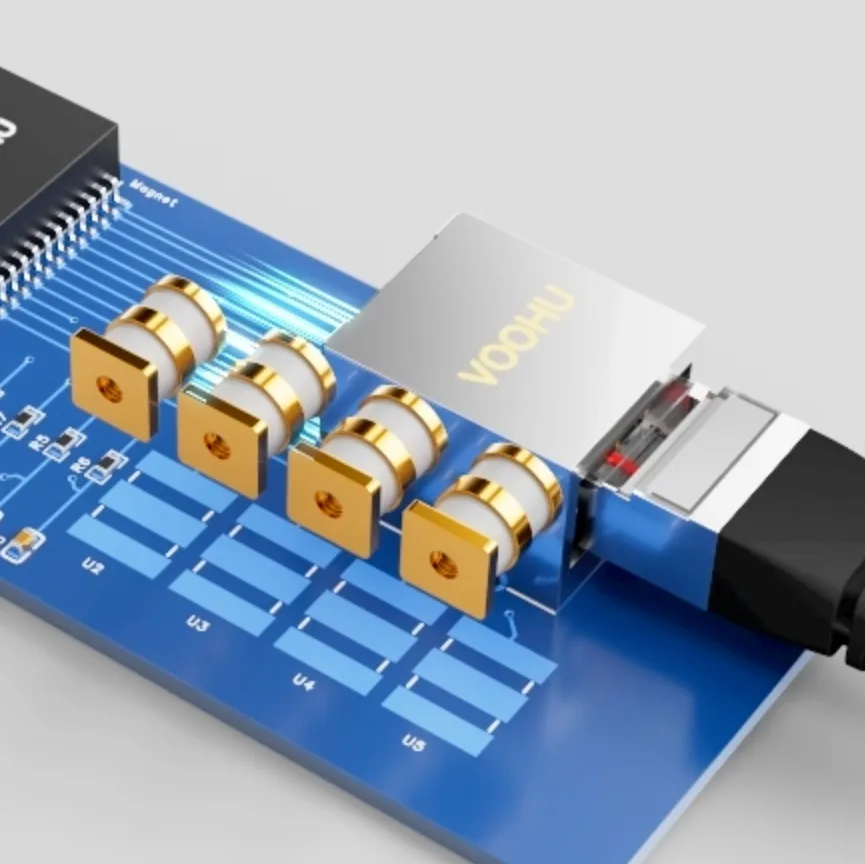
Ethernet port surge protection on a PCB is built in stages. A gas discharge tube (GDT) on the cable side diverts most common-mode surge current to chassis or protective earth. The LAN transformer provides the galvanic isolation IEEE 802.3 requires, such as a 1500 V rms, 60 s withstand test, and keeps the remaining common-mode stress away from the PHY. A low-capacitance TVS or ESD array on the PHY side clamps whatever couples through differentially.
The target comes from IEC 61000-4-5 and your product standard: test levels 1 to 4 apply 0.5, 1, 2 and 4 kV open-circuit surges. Indoor ports with short cables often need only the transformer and an ESD array. Outdoor ports and cables that leave the building usually need all three stages.
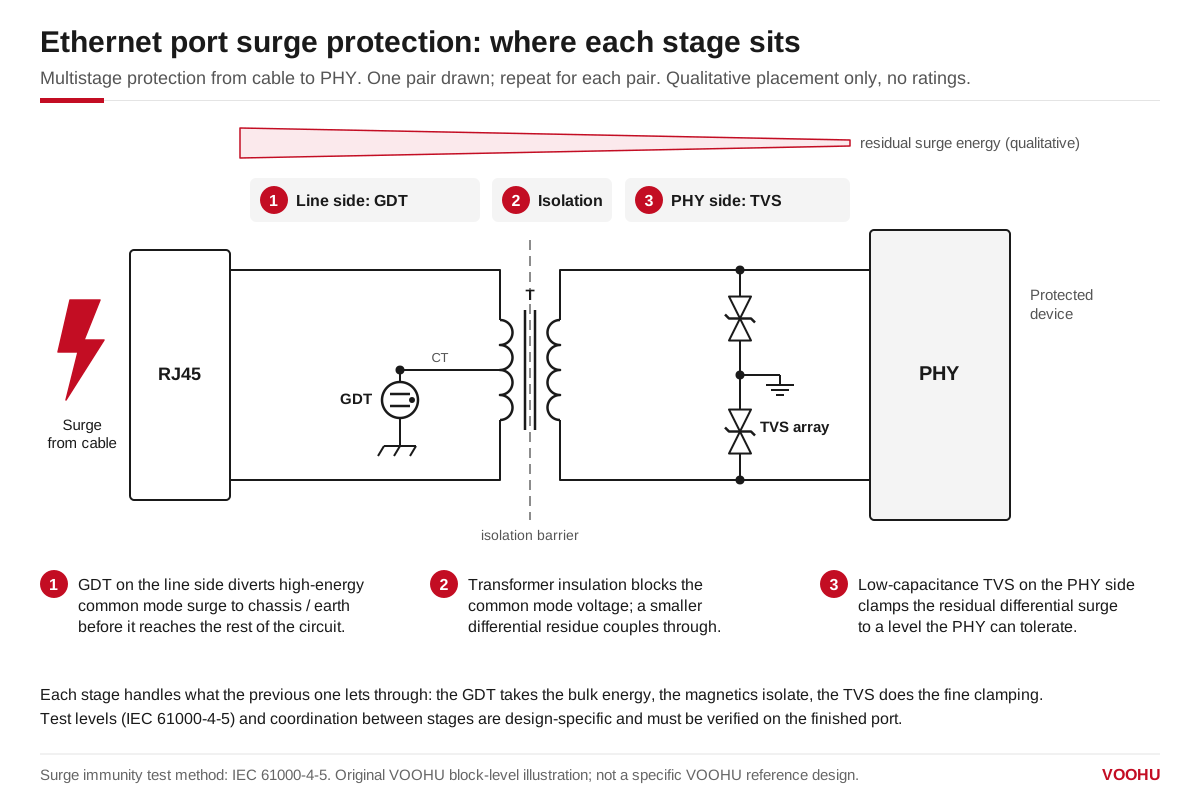
In multistage surge protection the GDT takes the bulk common mode energy, the LAN transformer isolates, and a TVS clamps what is left before the PHY.
#What does each surge protection stage do on an Ethernet port?
Each stage passes a smaller residue to the next. The GDT handles the energy, the transformer handles the voltage, and the TVS handles what is left at the PHY.
#How does a surge reach an Ethernet port: common mode or differential?
Lightning and switching surges couple onto the cable mostly as common-mode voltage: all eight wires rise together against earth. IEC 61000-4-5 also tests unshielded symmetrical lines such as twisted pair in common mode, with the surge applied from the lines to ground.
The LAN transformer blocks most common-mode voltage, because its windings are isolated from the PHY side. The stress lands across the isolation barrier instead. If the surge exceeds what the barrier can hold, it arcs through the transformer or the board. That is why a GDT on the cable side should fire first and take the current to chassis.
Some energy still reaches the PHY. Imbalance in the cable, connector and transformer converts part of the common-mode surge into differential voltage. Interwinding capacitance couples fast edges across the barrier. The PHY-side TVS or ESD array clamps that residue.
#Which IEC 61000-4-5 test level should the port pass?
IEC 61000-4-5 uses a combination wave generator: 1.2/50 μs open-circuit voltage and 8/20 μs short-circuit current. For symmetrical communication lines that run outdoors or between widely spread systems, the standard can call for a 10/700 μs waveform instead. Your product standard decides which waveform and level apply.
Read the product standard before you pick parts. Design the protection chain for the level that applies, then verify it on the finished board.
#How many protection stages does the port need?
A single TVS stage costs least and suits indoor equipment. GDT plus TVS costs more and belongs on harsh-environment and outdoor ports.
#How do you choose the GDT and TVS for an RJ45 port?
Choose the GDT by four ratings. The DC breakdown voltage must sit above the normal line voltage, including PoE. The impulse spark-over voltage sets how high the surge rises before the GDT fires. The surge current rating must cover the current your test level delivers. Capacitance must be low enough not to load the signal.
The VOOHU WHGD090V1P0B is a 2-pin GDT with 90 V DC breakdown, an impulse spark-over voltage of 600 V max at 1 kV/μs, and capacitance of 1 pF max. For package dimensions and surge current rating, see the datasheet.
On a PoE pair, a GDT that fires may keep conducting if the supply can hold its arc voltage. Check the follow-on behaviour in the datasheet against the PSE current limit.
Choose the PHY-side TVS or ESD array by standoff voltage, clamping voltage and capacitance. The standoff must sit above the signal swing. The clamping voltage must stay below what the PHY pins can withstand. Capacitance matters most at 1000BASE-T and above. Two low-capacitance VOOHU options are the WHTA3V30P8B (3.3 V, 0.8 pF, SOD323) and the WHALD03G4U (3.3 V, 0.3 pF, DFN2510-10L). Check their ESD ratings and clamping voltage in the datasheets.
#What changes for PoE ports, and how is this different from an Ethernet surge protector?
Under IEEE 802.3at and 802.3bt, a PSE can output up to 57 V. A TVS across the PoE rail needs a standoff above that and a clamping voltage below what the PSE or PD controller can survive. The WHTB058VA is a bidirectional TVS in a DO-214AB package; see the datasheet for its standoff and clamping values. Some designs also place a PTC resettable fuse in the power path to limit sustained overcurrent.
An Ethernet surge protector is a separate, inline device installed on a cable run, usually bought at retail. This guide covers protection designed into the port on the PCB. The two can work together, but an inline protector does not replace on-board protection.
#How do you lay out and verify the protection?
- Place the GDT and TVS as close to the RJ45 connector as possible.
- Keep their traces short and straight to reduce parasitic inductance.
- Keep the ground plane solid and give the chassis connection several low-impedance points.
- Keep the clearance across the transformer isolation barrier free of copper that would bypass it.
Verify the TVS clamping behaviour with transmission line pulse (TLP) testing. During the surge test, monitor the PHY pin voltage and confirm it stays below the PHY's rated limit. For speed-specific designs, see the 10/100BASE-TX and 10GBASE-T surge and ESD guides, and the article on Ethernet ports that stop working after a surge.
#Frequently asked questions
Do I need a GDT on every Ethernet port?
No. Indoor ports with short cables often pass with the LAN transformer and a PHY-side ESD array. Add a GDT when the cable runs outdoors, leaves the building, or the product standard asks for a higher IEC 61000-4-5 level.
Where should the TVS go: before or after the LAN transformer?
On the PHY side, close to the PHY pins. The transformer blocks most common-mode surge, so the TVS only clamps the differential residue. Use a low-capacitance array so the signal is not loaded, especially at 1000BASE-T.
Which IEC 61000-4-5 level should an Ethernet port pass?
Your product standard decides. The standard defines levels 1 to 4 at 0.5, 1, 2 and 4 kV. Indoor equipment usually sits at the lower levels; outdoor equipment and cables leaving the building usually need higher levels and a GDT stage.
Need a quote, samples or selection support?
Part number WHGD090V1P0B is filled in for you. Add the quantity and lead time and submit. Our FAE team will be glad to confirm the options for your project.
Before you order: samples, MOQ, lead time and import duties in our ordering guide →