RJ45 101 · Part 4 · New to RJ45? Start with Part 1: What is an RJ45 connector?
Many RJ45 connector problems that surface in the field trace back to choices made at selection, not to a bad batch. A typical case: your unit passed every lab test, and six months after going onto a factory line or an outdoor pole, its network port starts dropping out, the LEDs go dark or the port dies. The usual causes: plating worn through by plugging or corroded by damp air, a plug held only by its plastic tab, solder joints cracked by vibration, water or salt past the seal, a surge with no path to earth, a shield with no route to chassis, and magnetics overheating under PoE. Each has a datasheet line to check before you order.
Below, each failure runs from what you see to what to settle while the port is still on the drawing. A board that never links, never lights its LEDs or only reaches 100 Mbps from day one has a design problem instead: see our MagJack troubleshooting guide (a MagJack is an RJ45 jack with integrated magnetics) or our checks for a gigabit port stuck at 100 Mbps.
For the full list of questions to send with a quote, see Part 3: the RJ45 connector buyer's checklist.
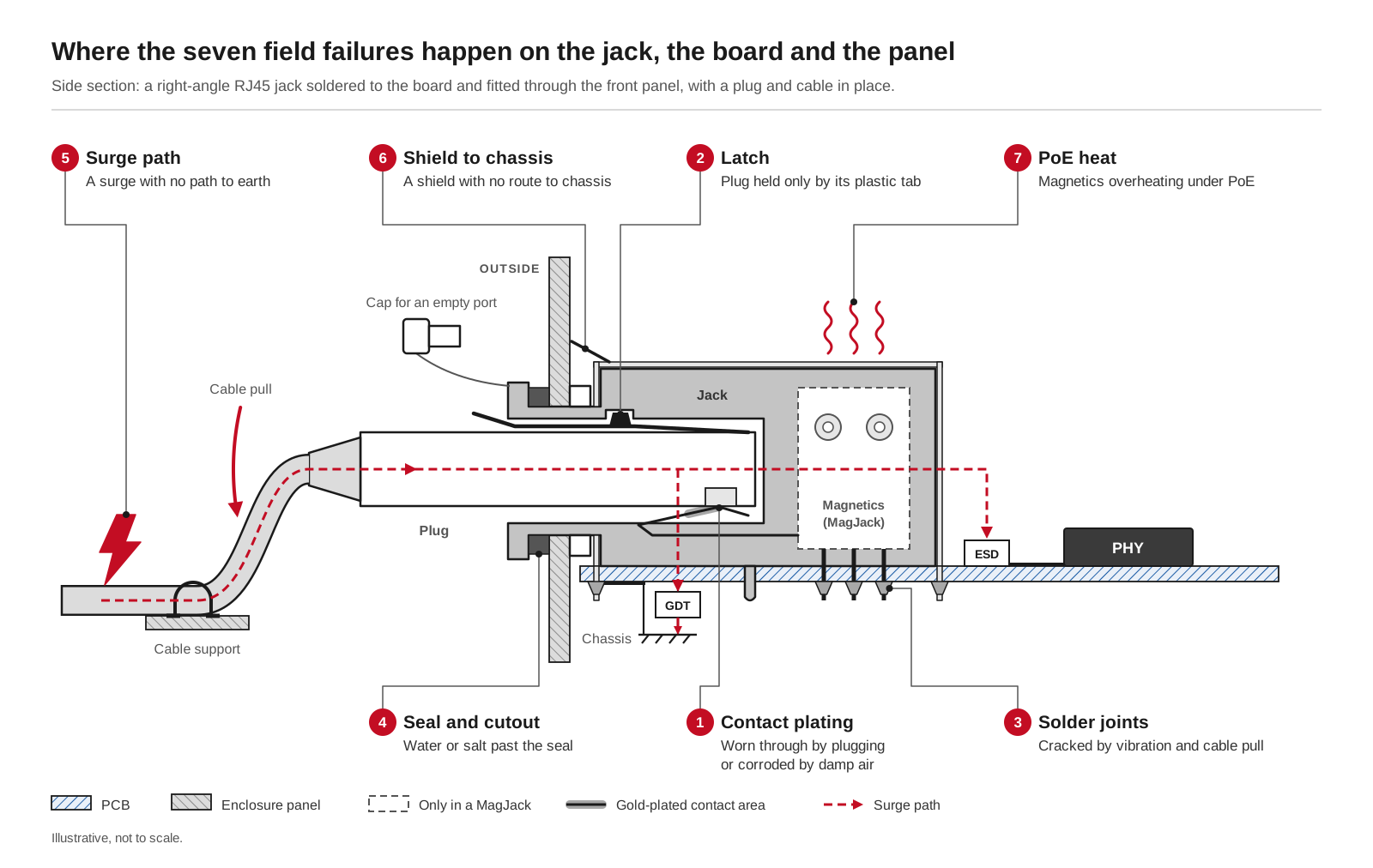
Where the seven field failures happen on the jack, the board and the panel. Illustrative, not to scale.
#Intermittent links from worn or thin contact plating
The link drops and comes back, errors climb or gigabit falls back to a lower speed, and replugging helps for a while. Each insertion wipes the plug blades across the jack's spring contacts and takes a little gold with it. Once the gold wears through, the nickel beneath oxidizes and contact resistance creeps up and wanders. Thin gold also has pores that let damp, salty or sulfur-bearing air through, and gold contacts mated with tin-plated plugs wear faster.
Check two datasheet lines: the gold thickness on the contact area, in microinches (µin, often written U), and the rated mating cycles, one cycle being one plug-in and pull-out. The SYT411Q199DB2A1DP MagJack, for example, states 6 µin on the contact area and 750 cycles minimum. Tell the supplier how often the port will be plugged and what air it will live in; for a test port or a coastal cabinet, ask which gold thicknesses the series offers and test samples with your own cables. Our guide to 3U, 6U and 50U gold plating explains each grade.
#Broken latches and loose plugs
Here the link does not flicker; it vanishes. The plug has backed out, or it sits loose and the link comes and goes when someone brushes the cable. A standard plug is held only by its small plastic latch tab, and cables pulled at an angle, snagged or shaken on a machine fatigue that tab until it stops holding or snaps off.
So decide early whether the plug may come out. If not, plan a locking RJ45 interface: a panel-mounted locking jack plus a matching locking cable connector, which our FAE team can help you pick. The WHA80001051AB33 is a 180° locking RJ45 with a PUSH press handle, spring clips and a metal panel. Its datasheet lists 3 to 20 N mating and unmating force, 750 cycles minimum and two operating temperature ranges, standard −20 to +70 °C and industrial −40 to +85 °C; for an outdoor or unheated site, ask our FAE team which range applies to the parts you order. See our locking RJ45 connectors for panel, board-mount and adapter versions.
#Cracked solder joints from vibration and cable pull
The port works on the bench, then drops out while the machine runs or when the cable moves, and a cable tester finds nothing. On vibrating equipment a hanging cable acts as a lever, and every shake lands on the jack's solder joints and housing. If the jack is held mainly by its signal pins, those joints crack and open for an instant under each shock, which the PHY, the chip that drives the link, sees as errors or short drops.
Read the mechanical drawing first. Through-hole retention posts locate the jack and take side loads, and shield tabs soldered through the board let the metal shell, not the signal pins, carry the cable's pull. The recommended PCB layout of the SYT1A11B002BA2A1D, a 10/100 MagJack, shows 2 × Ø3.20 mm retention-post holes and 2 × Ø1.63 mm shield-tab holes. Support the cable near the port too. If the datasheet gives no vibration rating, as with the jacks in our vibration-resistant RJ45 guide, your own vibration test on the port as it ships is the proof; send the profile with your sample request and our FAE team can confirm which parts to evaluate.

#Water, dust and salt air
After rain, a wash-down or a season near the coast, the port drops packets or the link goes up and down. Contacts may darken or discolor, since salt and sulfur attack thin or worn gold, and dust in an open port gets in the way of clean contact. Even a waterproof RJ45 leaks outside the conditions behind its rating: IP67 (6 for dust-tight, 7 for temporary immersion) holds only with the matching waterproof plug fully mated or a cap on the empty port, the seal fitted correctly and a panel no thicker than the drawing allows. A standard plug in a waterproof jack does not seal.
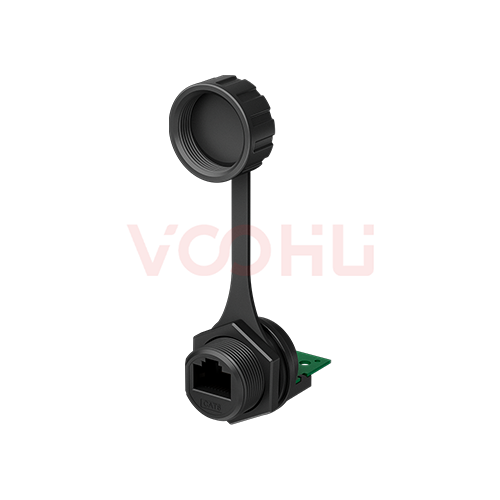
Ask under which condition the IP rating holds (plug mated, cap fitted, or both) and for which panel thickness, and get the cutout drawing. The WHPMWRJ1101 is marked IP67 on its drawing, which also shows a tethered dust cap and a recommended panel cutout of Ø20.70 mm with one flat side that stops the body turning as the nut is tightened; our FAE team can confirm its mating conditions and panel thickness for your enclosure. On other parts, order caps for ports that may stay empty, and see why water still gets into a waterproof RJ45 and our waterproof RJ45 connectors.
#Surge and lightning damage
After a thunderstorm or a surge test, the port is dead or only links at 100 Mbps, typically on outdoor cameras, gateways and ports whose cable leaves the building. Surges couple onto long cables mostly as common-mode voltage, all eight wires rising together against earth. The LAN transformer's isolation blocks most of it, so the stress lands across that barrier; unless something dumps the energy to chassis first, it arcs across or reaches the ESD parts and the PHY, which are more fragile than the windings.
Settle three things early. The surge level: IEC 61000-4-5 defines test levels from 0.5 kV to 4 kV, and your product standard picks one. The protection chain: outdoor and long-cable ports usually need a gas discharge tube (GDT) on the cable side to divert surge current to chassis, then the magnetics, then a low-capacitance TVS (transient voltage suppressor) or ESD array at the PHY. And for a MagJack, its isolation (hi-pot) rating and test condition, remembering that a hi-pot figure is not a surge rating: the surge level is proven on the finished board. See our Ethernet surge protection guide, and our guide to a port dead after a surge for telling a failed transformer from a failed PHY.
#EMC and ESD trouble
In the field, the port resets or drops its link when someone touches the cable or a motor starts nearby. The cable is a long antenna attached to your product. A shielded jack helps only when its metal shell has a short path to chassis ground, through shield tabs soldered to chassis copper, spring fingers on the panel, or both; a floating shell can do worse than none. The electrostatic discharge (ESD) diode near the PHY must clamp fast yet stay invisible to the signal, so too much capacitance, or mismatched parts on a pair, causes link errors of its own.
Decide shielded or unshielded together with the grounding plan: your customers' cable, a metal or plastic enclosure, shield tabs and spring fingers, and the panel cutout. Our guides to shielded vs unshielded RJ45 connectors and choosing an ESD protection diode for an Ethernet port go further; if a new MagJack design fails its EMC (electromagnetic compatibility) or ESD test, start with the troubleshooting guide above.
#Heat under PoE
Power over Ethernet (PoE) sends DC power over the data cable. A port that passed with one device can run hot once the whole system is loaded, because PoE current heats everything it passes: contacts, solder joints, the transformer's center taps (middle connections) and windings, board copper. In a multi-port jack the ports heat each other, and magnetics never rated for the current can saturate or overheat. A plain jack has no PoE rating of its own; the rating belongs to the magnetics.
Write down the PoE type (IEEE 802.3af, 802.3at or 802.3bt) and how many ports run at full load together, and check the magnetics' current rating and its condition against that. The SYT411Q199DB2A1DP, a 1×1 gigabit MagJack, lists a balanced DC line current of 720 mA max at 57 V DC continuous; our FAE team can confirm how that maps to your PoE type and power budget. Then measure temperature rise in your enclosure with every port loaded. Our PoE MagJack selection guide gives per-pair current for each type, or filter the RJ45 selector to jacks with integrated magnetics.

#What you see, what to check first, what to settle at selection
Take this table to your next design review or supplier call.
#FAQ
How do you tell if an Ethernet port on your equipment is going bad?
On equipment, watch for a link that drops in and out, error counts that keep rising, gigabit falling back to 100 Mbps, or a link that changes when the cable moves. Try a known-good cable and compare with a good port on the same model. A port that worked and then degraded points to the field causes above; one that never worked points to the design, covered in our MagJack troubleshooting guide.
Can lightning damage an Ethernet port?
Yes. A nearby strike induces surges on long cables, mostly as common-mode voltage, and a port with no path to dump the energy can lose its ESD diodes, its PHY or the isolation in its magnetics. Outdoor ports and cables that leave the building need protection most: a gas discharge tube to chassis, the magnetics and a TVS or ESD array at the PHY, verified at the surge level your product standard sets.
How many mating cycles does an RJ45 jack last?
The datasheet states it: 750 cycles minimum on the SYT411Q199DB2A1DP, SYT1A11B002BA2A1D and WHA80001051AB33, a common reference for RJ45. A rear port plugged a few times a year never gets close; a production test port plugged hundreds of times a day is a consumable to replace on a schedule. Thin plating, poor plugs and damp or salty air shorten contact life.
#Planning a port that has to last in the field?
Tell us where the port will live (a cabinet, outdoors, a vibrating machine), how often it will be plugged, the data rate, whether it carries PoE, and the surge or vibration test it must pass, through our sample and support form. Samples are available for evaluation, and selected parts are free of charge. Our FAE team will be glad to confirm the options for your project, including the plating, mounting and locking or sealed interface for your site. VOOHU supplies RJ45 and SFP connectors, LAN and PoE transformers and common mode chokes from Suzhou, China, to more than 1,500 customers. VOOHU has its own factories in Mianyang (magnetics) and Dongguan (connectors).
Earlier in the series:
- Part 1: What is an RJ45 connector?
- Part 2: RJ45 connector types
- Part 3: RJ45 connector buyer's checklist
Need a quote, samples or selection support?
Part number SYT411Q199DB2A1DP is filled in for you. Add the quantity and lead time and submit. Our FAE team will be glad to confirm the options for your project.
Before you order: samples, MOQ, lead time and import duties in our ordering guide →